
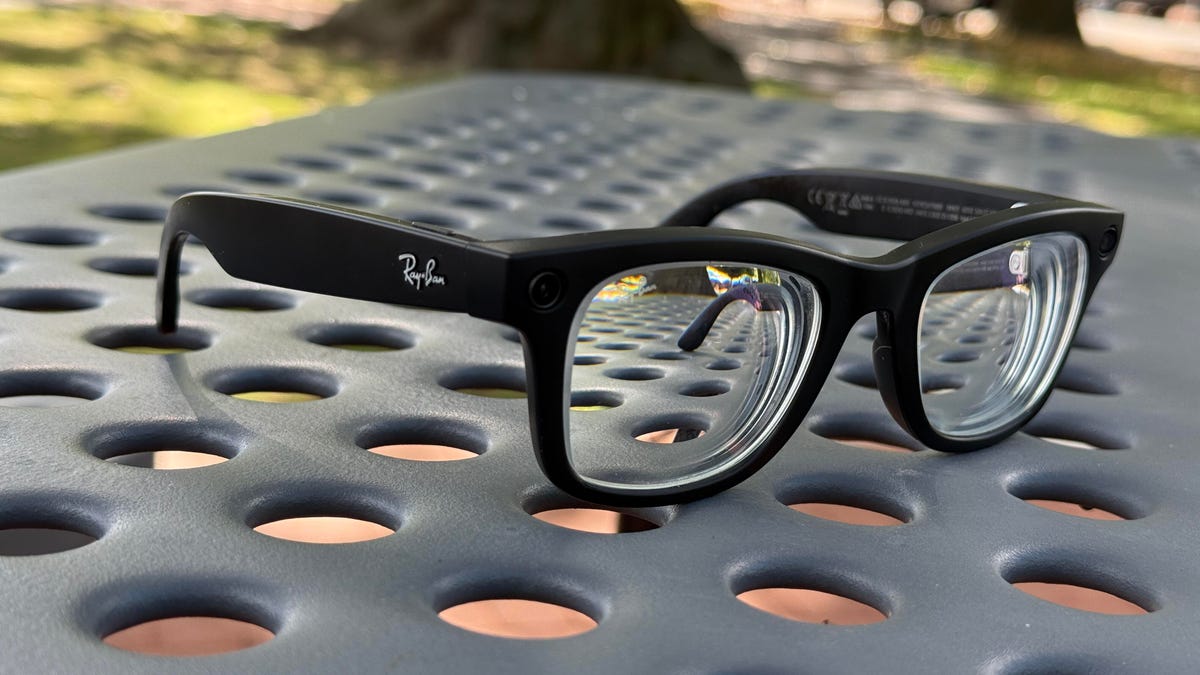
There’s one big question looming over anyone who considers smart glasses tech right now: Do you want to wear something with tech on your face? And, for how long? And is that something you’re even comfortable with, conceptually? The decision when it comes to display-enabled tethered glasses and wireless glasses is pretty different.
Display glasses vs. camera and audio glasses
Tethered glasses are really more like eye headphones that you’re perching on your face over your eyes. Although they have somewhat see-through lenses, they’re not made for all-day wear. You’ll put them on for movies, playing games or doing work, and then take them off. The commitment level might be a couple of hours a day at most.
Meanwhile, wireless smart glasses aim to be true everyday glasses. They’ll likely replace your existing glasses, become an additional pair or maybe act as smart sunglasses. But if you’re doing that, keep in mind you’ll need to outfit them with your prescription… or, get used to the limited battery life of wireless glasses. Meta Ray-Bans last several hours on a charge, depending on how they’re used. After that, they need to be recharged in their case, so you’ll need to wear another pair of glasses or just accept wearing a pair with a dead battery.
Meanwhile, there are other smart glasses that have longer battery life, like the Even Realities G2, but lack cameras and built-in speakers.
Live AI, Meta’s newest Ray-Bans feature, can keep a constant camera feed on the world. I tested it out.
AI and its limits…and privacy
You’ll also want to consider what you’ll use the glasses for, and what devices or AI services you use. Wireless audio and video glasses like Ray-Bans need a phone app to pair and use with, but they can also act as basic Bluetooth headphones with any audio source. However, Meta Ray-Bans are limited to Meta AI as the functioning onboard AI service, with a few hook-ins to apps like Apple Music, Spotify, Calm and Facebook’s core platforms. You’re living in Meta’s world, and that’s a big problem when it comes to trusting the glasses to have a responsible data policy. You can choose to not use the AI features on Meta glasses, something I do because a lot of the AI functions aren’t that useful for me anyway.
Meta is opening up its smart glasses to app developers, although to what degree is still unknown. Meta’s newest Ray-Ban Display glasses, meanwhile, add more apps but mainly for Facebook app-connected functions. Meta’s also beginning to support connected fitness devices, but only with Garmin and its upcoming Oakley Vanguard sports visor for now.
Google’s next wave of glasses expected later this year should be more flexible, tapping into Gemini AI and more Google apps and services. But we still don’t know the entire limits of those glasses, either.
Apple is also expected to have its own AI-enabled glasses within the next year. In other words: things will be changing fast in this space.
AI-enabled glasses can often use AI and the onboard camera for a number of assistive purposes like live translation or describing an environment in detail. For those with vision loss or assistive needs, AI glasses are starting to become an exciting and helpful type of device, but they’re more limited than what you can do on phones and computers right now. Meta’s AI functions on glasses aren’t as flexible — you can’t necessarily add documents and personal information into it in the same way you can with other services. At least, not yet.
Tethered display glasses have limits, too
Display-enabled tethered glasses use USB-C to connect to gadgets that can output video via USB-C, like phones, laptops, tablets and even handheld game consoles. But they don’t all work the same. Phones can sometimes have app incompatibilities, preventing copyrighted videos from playing in rare instances (like Disney+ on iPhones). Steam Decks and Windows game handhelds work with tethered display glasses, but the Nintendo Switch and Switch 2 don’t, and need proprietary and bulky battery pack “mini docks” sold separately to send a signal through. Some glasses-makers like Xreal are building more custom chipsets in-glasses to pin displays in space or customize display size, while others lean on extra software only available on laptops or certain devices to perform extra tricks. But the space here is also changing. Project Aura, coming this year, will pair Xreal display glasses to an Android mini-computer to run lots of apps in 3D and with hand tracking, like a tiny mixed reality headset. More devices like this could emerge, adding true 3D augmented reality and more.
Lots on the horizon
If this all sounds like a bit of a Wild West landscape, that’s because it is. Glasses right now remind me of the wrist wearable scene before the Apple Watch and Android watches arrived: It was experimental, inconsistent, sometimes brilliant and sometimes frustrating. Expect glasses to evolve quickly over the next year or so, meaning your choice to buy in now is not guaranteed to be a perfect solution down the road.
While Meta is currently leading the way on face wearables, it’s likely that glasses coming soon will be even more evolved. Once Google and Apple enter the picture, expect more app and service compatibility on smart glasses, too.
And, keep an eye on your wrist. Meta’s neural band for its display glasses is a sign of where others will follow, and Google and Apple will likely fold watch interactions with its glasses for easier gestures and shortcut controls.
More companies are entering this space, including longtime glasses-maker (and social app company) Snap. Snap’s everyday AR glasses are coming later this year, too, but we don’t know that much about them yet, although I’ve tried their bulky developer prototypes several times.











Leave a Reply